放假必备 |质谱开关机流程


进行以下操作前请先确保液相泵已停止!并且Analyst™硬件配置已失活。
关机流程
2、质谱关机

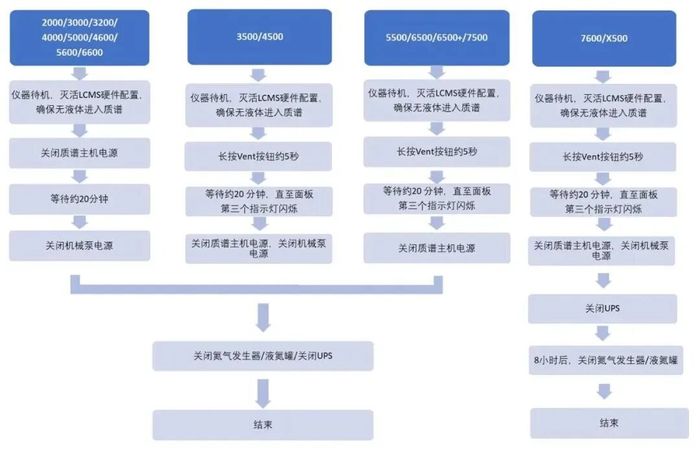
2000系列、3000系列、3200系列、4000系列、5000系列:关闭质谱主机电源,等待约30 min,关闭机械泵电源,关闭氮气发生器。
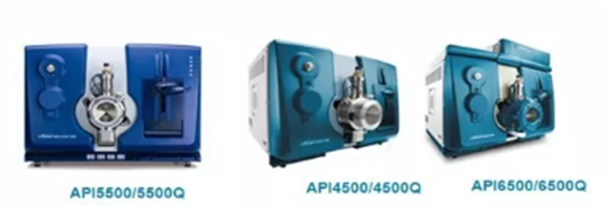
3500系列、4500系列、5500系列、6500系列:按Vent键5秒,等待约30 min,关闭主机电源,关闭氮气发生器。
3、关机详细流程图
进行以下操作前请先确保液相泵已停止!并且Analyst™硬件配置已失活。
注意:
1、现在4500系列关机先按vent按钮,等待15-30min后关闭机械泵电源,再等待15-30min后关闭主机电源。
2、关机之前确保分子涡轮泵机械泵等停止工作。
3、当遇到停电或其他需要时,需要关机,必须按下述操作。
首先,在Analyst软件的hardware configuration处,将硬件方法灭活。确定好硬件方法灭活,按住质谱侧面黑色“vent”键5秒,机器将会进行放真空,质谱仪正面的真空显示灯快速闪烁,等待20min左右(7-8min左右分子涡轮泵停止,15min左右仪器卸真空完成),真空显示灯会不亮,ready灯会慢速闪烁,此时表示真空已经放好了,可以将质谱侧面power键关掉。把机械泵电源关上。
开机流程
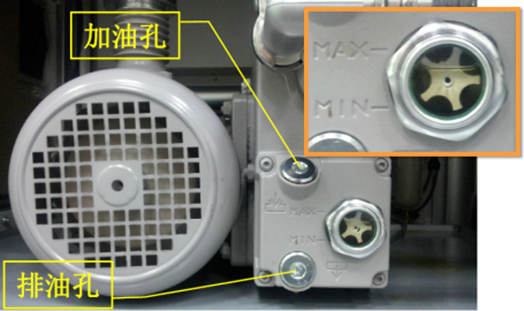
1、分子涡轮泵
检查泵油质量及油量,若泵油颜色变黄变黑、油量低于下限,请及时更换泵油。
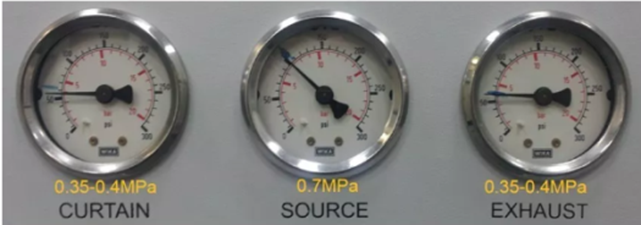
2、氮气
开启氮气发生器/液氮管(打开增加阀)确认压力正常
3、电源
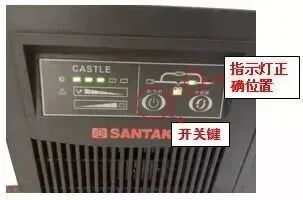
仪器通过UPS供电,其目的是提供稳压电流及预防突然停电对仪器和数据造成损害,开机时应确保UPS指示灯在正确位置上,倘若指示灯不在下图所示位置,长按开关键5秒放开,指示灯会自动跳至正确位置:
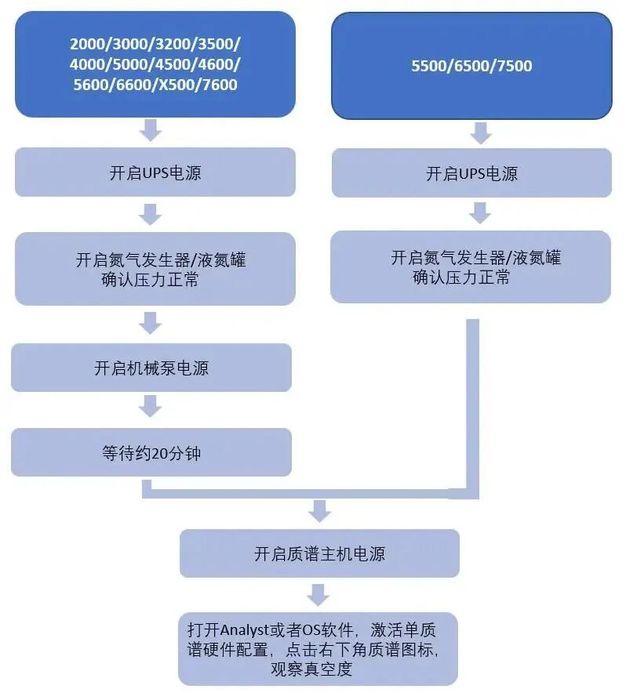
2000系列、3000系列、3200系列、4000系列、5000系列:打开机械泵电源,等待约1 h,打开质谱主机电源。
3500系列、4500系列、5500系列、6500系列:直接打开质谱主机电源。
激活质谱,打开软件右下角质谱图标,观察分子泵及真空读数状态,是否正常开启。抽真空过夜,观察真空读数,达到质谱要求真空度后才能正常使用。
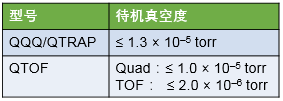
4、待机真空数值
当待机真空到达以下读数时,可进行调谐/测试样品:
5、液相开机
依次打开液相各单元,将输送水相的流动相管路置换成超纯水,洗针液管路置换成50%甲醇水溶液,柱塞杆清洗管路置换成10%异丙醇水溶液。流动相管路排气5 min,自动进样器管路排气25 min,以50%甲醇水溶液0.4 mL/min的流速冲洗流路60 min,停止输液,安装色谱柱。
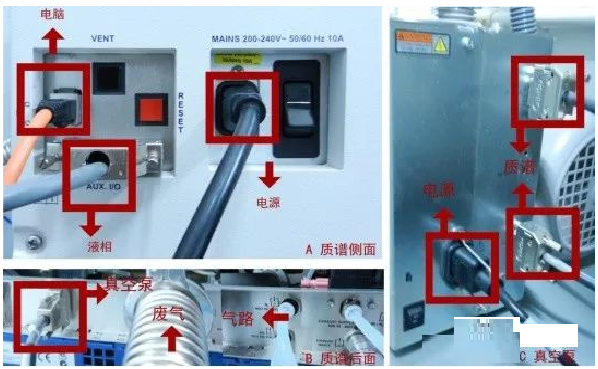
注意:
1、仪器开机前要先开UPS,UPS可在停电后提供给仪器1-2h的供电,防止仪器突然关机损坏。
2、4500以前的系列开主机前需要先打开机械泵电源抽真空,型号越久抽真空时间越长,保证仪器开机足够的真空度,一般15-30min即可。
3、真空至真空度达到1.0×10e5tor(2.0×10e5tor)以下时,仪器开机成功,在建立新方法的时候,建议将质谱的真空状态、柱子的初始压力等作为参照对比。


关机流程
1. 冲洗系统:拆下色谱柱,换上双通,首先使用大比例水相将系统中的缓冲盐移除,然后更换成大比例有机相移除有机污染物,最后将整个液相系统保存在有机相(避免使用乙腈)中
注意:反相体系需要将水相通道中的溶剂置换为甲醇
2. 维护离子源:质谱切换至Standby,异丙醇水溶液浸润无纺布清洁离子源。
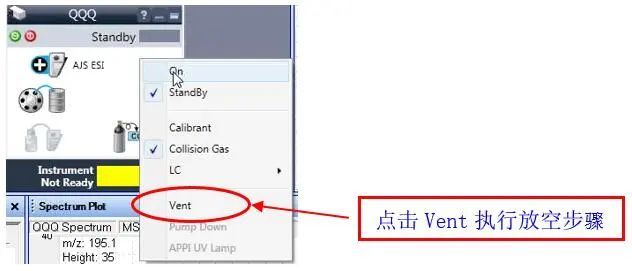
3. 在MassHunter采集软件内点击三级四极杆MS的图标,依下图所示选择Vent。
4. 如果短期不用,建议不要关机,质谱保持Standby即可,需保持气源充足、电压稳定。如果长期不用,需要执行关机程序:进入Masshunter采集软件,点击Vent放真空。
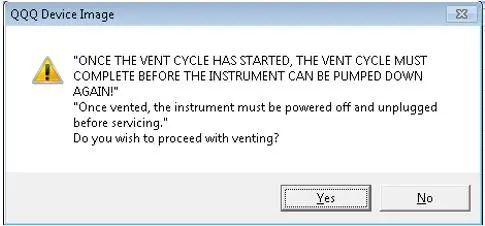
出现下述提示,如果确认要放空,选择Yes。
5. 可以在三重四极杆Method的Diagnosis界面观察涡轮泵转速的下降情况。
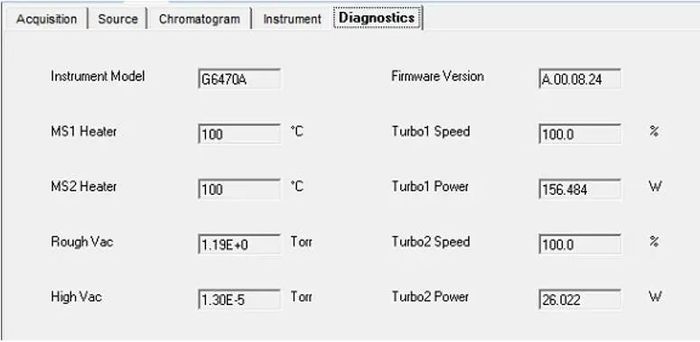
6. 分子涡轮泵转速和功率基本为0后,等待30分钟,关闭MassHunter 软件。然后关闭质谱及LC各模块,PC的电源。如果长时间关机的话请拔掉质谱主电源线;如果使用液氮罐,同时关闭自增压阀门;如果使用氮气发生器,关闭氮气发生器。
注意事项
如果长时间关机的话请拔掉质谱主电源线。
如果使用液氮罐,同时关闭自增压阀门。
如果使用氮气发生器,关闭氮气发生器。
注意:建议不要关闭碰撞气用的高纯氮的减压阀。仪器关机后,并不会消耗高纯氮,但是,这样可以使整个管路保持正压,有效保护高纯氮的捕集阱不被环境空气污染。
开机流程
打开液氮罐或氮气发生器,待压力输出稳定后,调节输出压力为约0.7 MPa(~100 psi),并确认前级泵的镇气阀处于关闭状态。打开高纯氮主阀门,调节高纯氮气钢瓶次级减压表输出压力至0.15 MPa(最大不要超过0.2 MPa)。
1. 打开计算机,网络交换机(LAN Switch)电源。
2. 打开液相各个模块电源。
3. 打开质谱前面左下角的电源开关,这时可以听到质谱里面溶剂切换阀切换的声音。同时机械泵开始工作,仪器开始自检。等待大约两分钟,听到第二声溶剂阀切换的声音(表明质谱自检完成)后,表示仪器自检完成,可以联机。
质谱一接通电源,前级真空规就开始工作,监视前级真空值。但只有当Turbo1和Turbo2涡轮泵的转速都大于95%之后,四极杆的高真空规才会开始工作,正常读取真空值。
4. 在计算机桌面上双击MassHunter采集软件图标,进入MassHunter工作站。


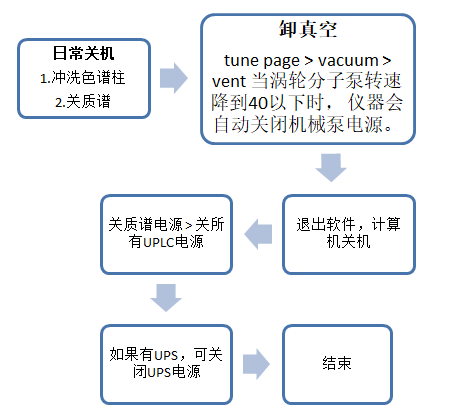
完成日常关机
完成实验后,应根据色谱柱的使用说明或维护指南,对色谱柱进行冲洗保存。一般如果流动相中有缓冲盐必须先将缓冲盐用高水相冲洗掉,再从高水相过渡到高有机相(如95%以上乙腈),冲洗10倍以上柱体积,停流速。
关质谱:关高压(STANDBY) > 等待去溶剂气温度降低至100度以下 > 关氮气。
关机流程
Unifi欢迎界面,点My Work,选择Instrument System标签,双击仪器系统,进入仪器系统控制台,选择System(质谱)>Menu(Maintain )> Maintain(Vacuum),点Vent放真空,监测三个Tubo Speed降低到0%附近,关闭质谱与液相电源,关闭LND,关闭 UPS电源(LND关闭后等待两分钟后再关闭),拔下仪器插头,关闭电脑主机与显示器。
tune page > vacuum > vent > 当涡轮分子泵转速降到40以下时, 仪器会自动关闭机械泵电源。
开机流程
1、打开液氮罐,使进口端压力达到100 Psi并稳定 15分钟以上,打开氩气气罐使压力达到6-7 Psi。
2、打开电脑主机,打开UPS电源,打开LND,插上液质仪所有电源插头(共6个〉,打开液相电源(顺序不分先后〉,等待仪器完成自检,打开质谱等待仪器完成自检。
3 、在Unifi欢迎界面点My Work,在Instrument System标签下双击仪器系统,进入仪器系统控制台,选择System>XevoTQ-S>maintain> Vacuum,点击 Pump进行抽真空操作,5分钟内三个Turbo Speed达到100%,通常抽真空至少5个小时,最终使CollisionCell、Analyzer、Analyzer penning、Ion Guide真空度分别达到。3e-5, 3e-6, 3e-3。
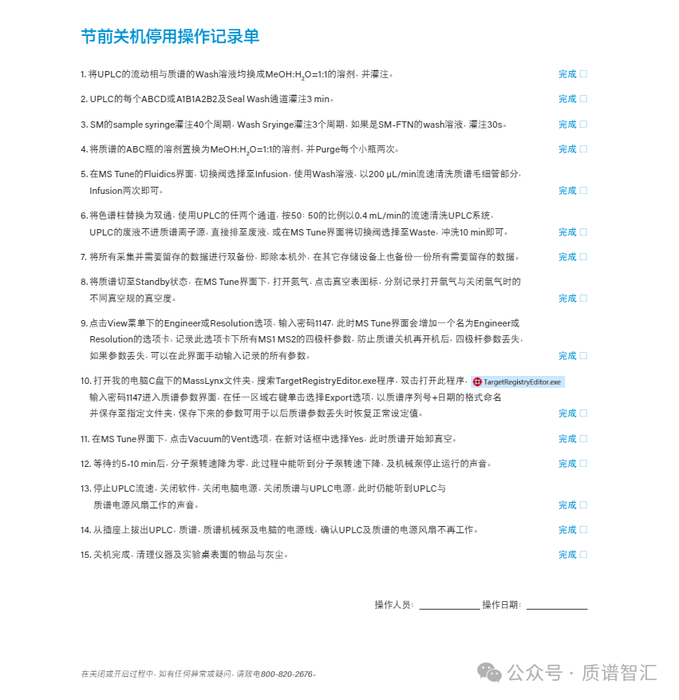


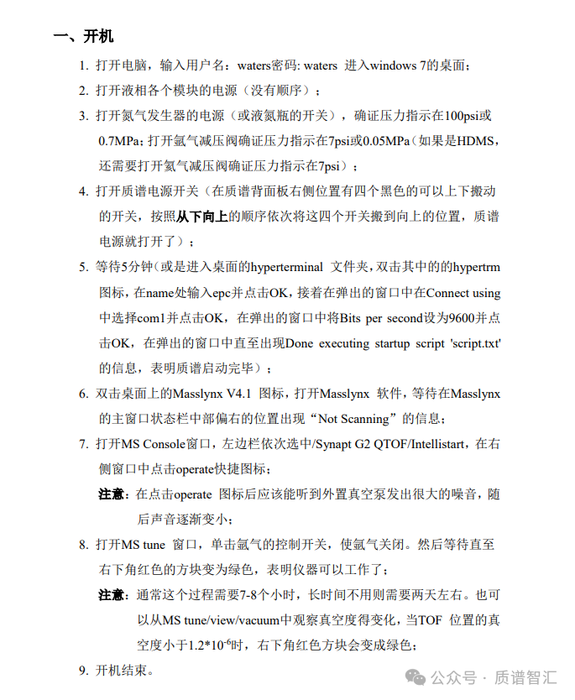
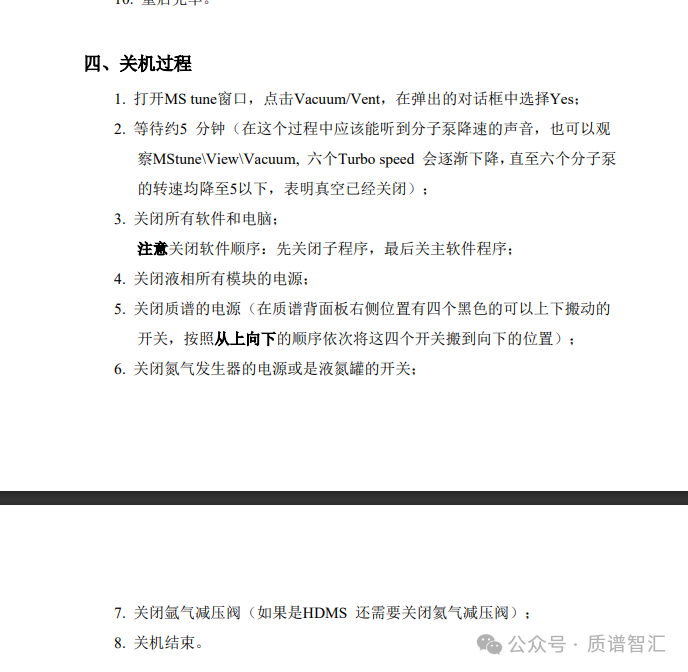
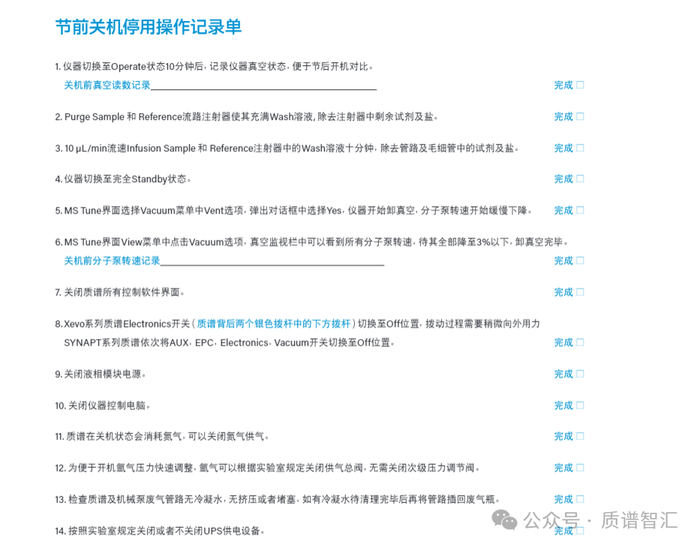


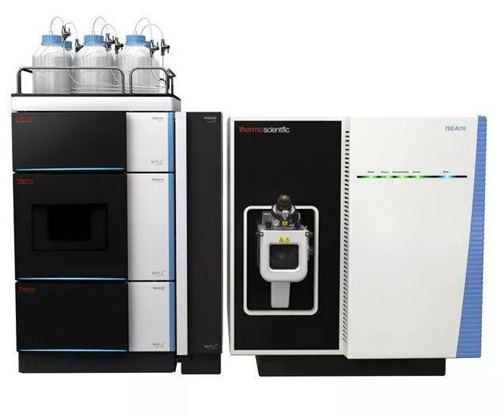
TSQ系列三重四极杆液质联用仪 TSQ series triple quadrupole LC/MS
关机步骤 Shutdown steps
1. 分析完成后,运行洗柱和保护柱的程序,洗柱完成后,将液相泵流速设置为0。1. After the analysis is completed, run the program of column washing and guard column. After the column washing is completed, set the liquid phase pump flow rate to 0.
2. 将质谱设置为待机Standby状态。 2. Set the mass spectrometer to standby state.
3. 关闭电子服务开关(Electronics Service Switch)。3. Turn off the Electronics Service Switch.
4. 等待1 min关闭真空开关(Vacuum Switch)(Quantum以外系列的仪器请跳过此步骤)。4. Wait 1 minute to turn off the Vacuum Switch (skip this step for instruments other than Quantum series).
5. 同时关闭质谱仪主电源开关(Main Power Switch)至Off位置。5. At the same time, turn off the main power switch of the mass spectrometer (Main Power Switch) to the Off position.
6. 关闭液相部分电源开关。 6. Turn off the power switch of the liquid phase section.
7. 关闭计算机。 7. Shut down the computer.
8. 关闭UPS电源,关闭氮气或者氮气发生器以及氩气钢瓶总阀及分压阀。8. Turn off the UPS power supply, turn off the nitrogen or nitrogen generator, and the main valve and pressure dividing valve of the argon cylinder.
开机步骤 Boot steps
1.打开氩气钢瓶的开关,确认总压大于2MPa,分压调至0.135MPa。打开氮气钢瓶的开关,确认总压大于2MPa,分压调至0.7MPa。1. Turn on the switch of the argon gas cylinder, confirm that the total pressure is greater than 2MPa, and adjust the partial pressure to 0.135MPa. Turn on the switch of the nitrogen cylinder, confirm that the total pressure is greater than 2MPa, and adjust the partial pressure to 0.7MPa.
2. 检查洗针溶液和后密封清洗溶液的量以及流动相的量。2. Check the amount of needle wash solution and post-seal wash solution as well as the amount of mobile phase.
3. 打开UPS开关,检查电源电压输出是否稳定且零地电压是否小于1V。3. Turn on the UPS switch and check whether the power supply voltage output is stable and whether the zero-ground voltage is less than 1V.
4. 检查机械泵,查看泵油颜色是否正常,呈浅黄色,油面在中间刻度线以上。4. Check the mechanical pump to see if the color of the pump oil is normal, light yellow, and the oil level is above the middle mark.
5. 打开仪器主开关至ON,机械泵会随之启动。 5. Turn the main switch of the instrument to ON, and the mechanical pump will start.
6. 打开Vacuum开关(Quantum以外系列的仪器请跳过此步骤)。6. Turn on the Vacuum switch (please skip this step for instruments other than Quantum series).
7. 用密封垫堵上离子传输毛细管,抽真空约12小时后(或者隔夜),移除密封垫,打开电子开关(Electronics)。7. Plug the ion transmission capillary with a sealing gasket. After vacuuming for about 12 hours (or overnight), remove the sealing gasket and turn on the electronics switch (Electronics).
8. 打开计算机(此时液相和质谱内置的CPU会通过网线与电脑主机建立通讯联系,这个时间大约要1-2 min)。8. Turn on the computer (at this time, the built-in CPU of the liquid phase and mass spectrometer will establish communication with the computer host through the network cable, this time takes about 1-2 minutes).
9. 确认质谱前面板上的power、vacuum、communication指示灯均为绿色,双击桌面上Tune图标,进入质谱界面,查看质谱状态,确认前级压(Fore Pump Pressure)TSQ Quantiva小于4.5 Torr,TSQ Endura小于2.0 Torr,TSQ Altis小于3.0 Torr,离子规压力(Ion Gauge Pressure)小于 4e-6 Torr(TSQ Endura),9e-6(TSQ Quantiva),TSQ Altis Analyzer Pressure < 9e-6。9. Confirm that the power, vacuum, and communication indicators on the front panel of the mass spectrometer are all green. Double-click the Tune icon on the desktop to enter the mass spectrometer interface, check the mass spectrometer status, and confirm that the fore pump pressure (Fore Pump Pressure) TSQ Quantiva is less than 4.5 Torr, and TSQ Endura Less than 2.0 Torr, TSQ Altis less than 3.0 Torr, ion gauge pressure (Ion Gauge Pressure) less than 4e-6 Torr (TSQ Endura), 9e-6 (TSQ Quantiva), TSQ Altis Analyzer Pressure < 9e-6.
10. 打开质谱扫描,打开液相自动进样器和泵以及柱温箱的电源。10. Turn on the mass spectrometer scan, turn on the power to the liquid phase autosampler and pump, and the column oven.
11. 对质谱进行调谐校正。 11. Tuning and calibrating the mass spectrum.
12. 设定质谱及色谱条件参数,平衡色谱柱,准备进样。12. Set the mass spectrometry and chromatography condition parameters, equilibrate the chromatographic column, and prepare for injection.
高分辨 high resolution
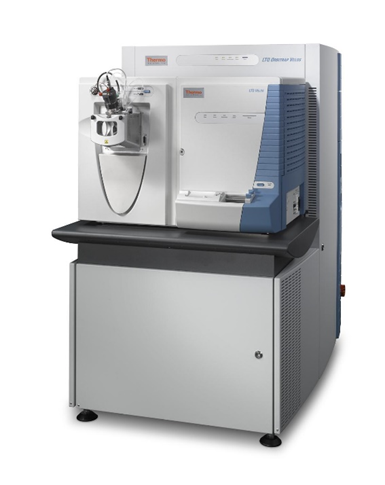
LCQ/LTQ系列离子阱液质联用仪 LCQ/LTQ series ion trap liquid mass spectrometer
关机步骤 Shutdown steps
1. 分析完成后,运行洗柱和保护柱的程序,洗柱完成后,将液相泵流速设置为0。1. After the analysis is completed, run the program of column washing and guard column. After the column washing is completed, set the liquid phase pump flow rate to 0.
2. 将质谱设置为待机Standby状态。 2. Set the mass spectrometer to standby state.
3. 关闭电子服务开关(Electronics Service Switch)。3. Turn off the Electronics Service Switch.
4. 关闭质谱仪主电源开关(Main Power Switch)至Off位置。4. Turn off the mass spectrometer’s Main Power Switch to the Off position.
5. 关闭液相部分电源开关。 5. Turn off the power switch of the liquid phase section.
6. 关闭计算机。 6. Shut down the computer.
7. 关闭UPS电源,关闭氮气和氦气钢瓶总阀及分压阀。7. Turn off the UPS power supply, and close the main valve and pressure dividing valve of nitrogen and helium cylinders.
开机步骤 Boot steps(从Off\停机至就绪\Standby状态) (From Off\Stop to Ready\Standby state)
1. 打开氦气钢瓶的开关,确认总压大于2MPa,分压调至0.3Mpa,分压要求在200至350 kPa之间(30-50 psi)。1. Turn on the switch of the helium cylinder, confirm that the total pressure is greater than 2MPa, adjust the partial pressure to 0.3Mpa, and the partial pressure is required to be between 200 and 350 kPa (30-50 psi).
2. 打开氮气钢瓶的开关,确认总压大于2MPa,分压调至0.7MPa,分压要求在550至830 kPa(80-120 psi)之间。2. Turn on the switch of the nitrogen cylinder, confirm that the total pressure is greater than 2MPa, adjust the partial pressure to 0.7MPa, and the partial pressure is required to be between 550 and 830 kPa (80-120 psi).
3. 打开UPS开关,检查电源电压输出是否稳定且零地电压是否小于1V。3. Turn on the UPS switch and check whether the power supply voltage output is stable and whether the zero-ground voltage is less than 1V.
4. 检查机械泵,查看泵油颜色是否正常,呈浅黄色,油面在中间刻度线以上。打开仪器主电源开关(Main power)——On(I)模式,此时机械泵启动,分子涡轮泵也随之启动并逐渐增速。4. Check the mechanical pump to see if the color of the pump oil is normal, light yellow, and the oil level is above the middle mark. Turn on the instrument's main power switch (Main power) - On (I) mode. At this time, the mechanical pump starts, and the molecular turbo pump also starts and gradually increases its speed.
5. 打开主电源超过8小时后,打开计算机,将电子开关打开至Electronics Normal(I)模式。此时电子开关被打开,仪器前面板LED灯点亮、LCQ Fleet开始与计算机进行通讯(计算机上保持 instrument console 窗口不要关闭)。5. After turning on the main power for more than 8 hours, turn on the computer and turn the electronic switch to Electronics Normal (I) mode. At this time, the electronic switch is turned on, the LED light on the front panel of the instrument lights up, and LCQ Fleet begins to communicate with the computer (keep the instrument console window on the computer closed).
6. 约3分钟以后,LCQ Fleet与计算机通讯完成。6. After about 3 minutes, the communication between LCQ Fleet and the computer is completed.
7. 在Tune Plus界面右侧状态栏中,检查LCQ Fleet真空度情况。前级真空度(Convectron gauge)要求在1.2 ~ 1.8 Torr,离子规(Ion gauge)读数要求在0.75 × 10⁻⁵至1.5 × 10⁻⁵ Torr之间(离子传输毛细管开放,温度250 ℃)。7. In the status bar on the right side of the Tune Plus interface, check the vacuum level of LCQ Fleet. The front stage vacuum degree (Convectron gauge) is required to be between 1.2 ~ 1.8 Torr, and the ion gauge (Ion gauge) reading is required to be between 0.75 × 10⁻⁵ and 1.5 × 10⁻⁵ Torr (the ion transmission capillary is open and the temperature is 250°C).
8. 若真空满足要求,即可将质谱切至扫描(On)模式,校正仪器。8. If the vacuum meets the requirements, switch the mass spectrometer to scan (On) mode and calibrate the instrument.
9. 液相部分电源开启,更换流动相。 9. Turn on the power supply of the liquid phase section and replace the mobile phase.
10. 设定质谱及色谱条件参数,平衡色谱柱,准备进样。10. Set the mass spectrometry and chromatography condition parameters, equilibrate the chromatographic column, and prepare for injection.
QE和OE系列高分辨液质联用仪 QE and OE series high-resolution LC/MS
关机步骤 Shutdown steps
1. 分析完成后,运行洗柱和保护柱的程序,洗柱完成后,将液相泵流速设置为0。1. After the analysis is completed, run the program of column washing and guard column. After the column washing is completed, set the liquid phase pump flow rate to 0.
2. 仪器standby。 2. Instrument standby.
3. 关闭电子服务开关(Electronics Service Switch)3. Turn off the Electronics Service Switch
4. 等2 min后关主开关(Main Power)。4. Wait 2 minutes and then turn off the main switch (Main Power).
5. 关液相部分。 5. Close the liquid phase section.
6. 关电脑。 6. Turn off the computer.
7. 关UPS。 7. Turn off the UPS.
8. 15 min后关高纯氮钢瓶总阀和分压阀以及氮气发生器。8. After 15 minutes, close the main valve, partial pressure valve and nitrogen generator of the high-purity nitrogen cylinder.
9. 倾倒废液。 9. Dump the waste liquid.
开机步骤 Boot steps
1. 打开氮气钢瓶的开关和氮气发生器,高纯氮0.6 MPa,氮气发生器7.1 bar左右,使气体充满管路并且稳定。1. Turn on the switch of the nitrogen cylinder and the nitrogen generator. The high purity nitrogen is 0.6 MPa and the nitrogen generator is about 7.1 bar, so that the gas fills the pipeline and is stable.
2. 打开UPS开关,检查电源电压输出是否稳定且零地电压是否小于1V。2. Turn on the UPS switch and check whether the power supply voltage output is stable and whether the zero-ground voltage is less than 1V.
3. 15 min后开质谱主开关(Main Power),抽真空1-2 h,开电子开关。3. After 15 minutes, turn on the main switch of the mass spectrometer (Main Power), evacuate for 1-2 hours, and turn on the electronic switch.
4. 开Tune软件,联机正常后,开启烘烤程序烘烤真空腔体:QE系列手动烘烤,OE系列自动烘烤。4. Open the Tune software. After the connection is normal, start the baking program to bake the vacuum chamber: manual baking for the QE series and automatic baking for the OE series.
5. 烘烤结束后,正常情况下,质谱面板指示灯为绿色,前级真空在1.5-2.0Torr之间,分子涡轮泵转速为750Hz,UHV小于5*e-8 Torr;开启Tune软件烘烤10-12h,次日UHV真空小于1.2*e-9 Torr。5. After baking, under normal circumstances, the indicator light on the mass spectrometer panel is green, the front vacuum is between 1.5-2.0Torr, the molecular turbo pump speed is 750Hz, and the UHV is less than 5*e-8 Torr; turn on the Tune software for baking 10-12h, the UHV vacuum is less than 1.2*e-9 Torr the next day.
6. 若真空满足要求,即可将质谱切至扫描(On)模式,校正仪器。6. If the vacuum meets the requirements, switch the mass spectrometer to scan (On) mode and calibrate the instrument.
7. 液相部分电源开启,更换流动相。 7. Turn on the power supply of the liquid phase section and replace the mobile phase.
8. 设定质谱及色谱条件参数,平衡色谱柱,准备进样。8. Set the mass spectrometry and chromatography condition parameters, equilibrate the chromatographic column, and prepare for injection.
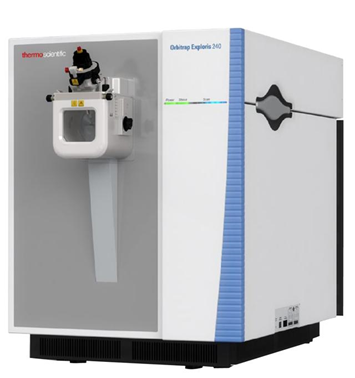
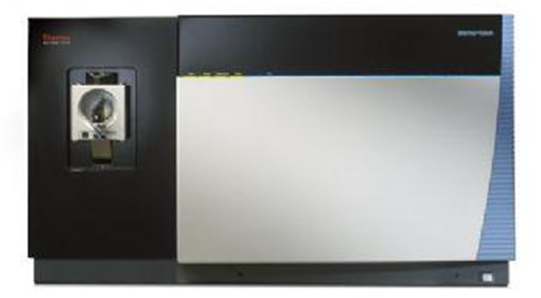
Orbitrap Fusion系列高分辨液质联用仪Orbitrap Fusion Series High Resolution LC/MS
关机步骤 Shutdown steps
1. 分析完成后,将液相泵流速设置为0。 1. After the analysis is completed, set the liquid phase pump flow rate to 0.
2. 仪器standby。 2. Instrument standby.
3. 关闭电子服务开关(Electronics Service Switch)3. Turn off the Electronics Service Switch
4. 等2 min后关主开关(Main Power)。4. Wait 2 minutes and then turn off the main switch (Main Power).
5. 关液相部分。 5. Close the liquid phase section.
6. 关电脑。 6. Turn off the computer.
7. 关UPS。 7. Turn off the UPS.
8. 15 min后关高纯氮和高纯氦钢瓶总阀和分压阀。8. After 15 minutes, close the main valve and partial pressure valve of the high-purity nitrogen and high-purity helium cylinders.
9. 倾倒废液。 9. Dump the waste liquid.
开机步骤 Boot steps
1. 打开氮气和氦气钢瓶的开关,高纯氮50 ± 10 psi,高纯氦40 ± 10 psi,使气体充满管路并且稳定。1. Turn on the switches of nitrogen and helium cylinders, high-purity nitrogen 50 ± 10 psi, high-purity helium 40 ± 10 psi, so that the gas fills the pipeline and is stable.
2. 打开UPS开关,检查电源电压输出是否稳定且零地电压是否小于1V。2. Turn on the UPS switch and check whether the power supply voltage output is stable and whether the zero-ground voltage is less than 1V.
3. 15 min后开质谱主开关(Main Power),抽真空1-2 h,开电子开关。3. After 15 minutes, turn on the main switch of the mass spectrometer (Main Power), evacuate for 1-2 hours, and turn on the electronic switch.
4. 开Tune软件,联机正常后,开启烘烤程序烘烤真空腔体。4. Open the Tune software. After the connection is normal, start the baking program to bake the vacuum cavity.
5. 烘烤结束后,正常情况下,质谱面板指示灯为绿色,同时Tune软件参数均为绿灯,Orbitrap UHV < 2.5e-10 Torr。5. After baking, under normal circumstances, the indicator light on the mass spectrometer panel is green, and the Tune software parameters are all green. Orbitrap UHV < 2.5e-10 Torr.
6. 若真空满足要求,即可将质谱切至扫描(On)模式,校正仪器。6. If the vacuum meets the requirements, switch the mass spectrometer to scan (On) mode and calibrate the instrument.
7. 液相部分电源开启,更换流动相。 7. Turn on the power supply of the liquid phase section and replace the mobile phase.
8. 设定质谱及色谱条件参数,准备进样。 8. Set the mass spectrometry and chromatography condition parameters and prepare for injection.
气质联用 GC-MS
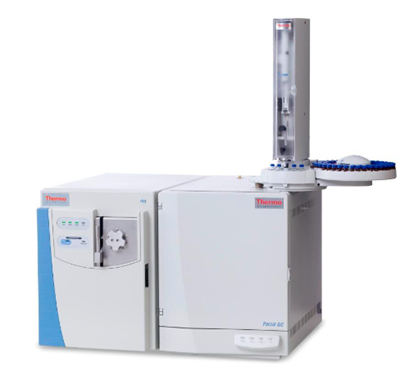
Trace ISQ单四级杆气质联用仪 Trace ISQ single quadrupole GC/MS
关机步骤 Shutdown steps
1. 在ISQ Dashboard中选择Instrument Control,先设定MS transfer line Temp 至50 °C,Ion source temp至50 °C,Send发送参数给仪器,后点击Shut down,等待Turbo‐pump Speed:0%,各温度需降至100 °C以下。1. Select Instrument Control in ISQ Dashboard, first set MS transfer line Temp to 50 °C, Ion source temp to 50 °C, Send parameters to the instrument, then click Shut down, wait for Turbo-pump Speed: 0%, Each temperature needs to be reduced to below 100 °C.
2. 在ISQ Dashboard中选择Method Editor/Trace1300 GC中Get Method form GC查看仪器当前参数设置,将S/SL Inlet Temperature勾选去除(如配置气相检测器需将检测器Temperature勾选去除),再选择Trace1300 菜单中的Send Method to GC 将现有参数发送给仪器,等待进样口温度降至100 °C以下。2. In the ISQ Dashboard, select Get Method form GC in Method Editor/Trace1300 GC to view the current parameter settings of the instrument, uncheck S/SL Inlet Temperature (if you configure a gas phase detector, you need to uncheck the detector Temperature), and then select Send Method to GC in the Trace1300 menu sends the existing parameters to the instrument and waits for the inlet temperature to drop below 100 °C.
3. 关闭ISQ的电源,关闭GC电源。 3. Turn off the power of the ISQ and turn off the power of the GC.
4. 关闭钢瓶总阀及分压阀。 4. Close the cylinder main valve and pressure dividing valve.
开机步骤 Boot steps
1. 确认GC进样口端和检测器端安装好毛细柱。 1. Confirm that the capillary columns are installed at the GC inlet and detector ends.
2. 确认ISQ的放空阀旋紧。 2. Make sure the ISQ vent valve is tightened.
3. 检查载气净化器是否失效,如已失效需更换新的。3. Check whether the carrier gas purifier has failed. If it has failed, replace it with a new one.
4. 如需更换机械泵泵油、进样针、隔垫及衬管,开机前进行更换。4. If you need to replace the mechanical pump oil, injection needle, septum and liner, do so before starting the machine.
5. 打开载气(氦气)钢瓶的开关,确认总压大于2 MPa,分压表调至0.5 MPa。5. Turn on the switch of the carrier gas (helium) cylinder, confirm that the total pressure is greater than 2 MPa, and adjust the partial pressure gauge to 0.5 MPa.
6. 确认插座,保证Trace 1300和ISQ已经接通电源。6. Check the socket to ensure that Trace 1300 and ISQ are powered on.
7. 打开电脑、气相、ISQ和自动进样器的电源开关,等待仪器自检。7. Turn on the power switches of the computer, gas phase, ISQ and automatic sampler, and wait for the instrument self-test.
8. 打开电脑桌面上工作站软件,连接仪器,检查软件通讯是否正常。8. Open the workstation software on the computer desktop, connect the instrument, and check whether the software communication is normal.
9. 找到对应设置柱信息的命令标签(Column Setup或者Column Properties),输入使用柱子的柱长内经等参数。9. Find the command label (Column Setup or Column Properties) corresponding to setting the column information, and enter the column length, inner diameter and other parameters of the column to be used.
10. 设置进样口的温度、载气和分流流量等参数,勾选“Vacuum compensation”。10. Set parameters such as inlet temperature, carrier gas, and split flow rate, and check "Vacuum compensation".
11. 在ISQ Dashboard 中查看ISQ状态,分子涡轮泵开始启动,待转速达到100%之后,在ISQ Dashboard中选择Instrument Control,设定MS transfer line Temp至250 °C,Ion source temp至280 °C,Send发送参数给仪器。11. Check the ISQ status in the ISQ Dashboard. The molecular turbo pump starts to start. After the rotation speed reaches 100%, select Instrument Control in the ISQ Dashboard and set the MS transfer line Temp to 250 °C and the Ion source temp to 280 °C. Send sends parameters to the instrument.
12. 建议抽真空过夜(前级泵压力≤ 80 mTorr),再进行调谐或使用仪器。12. It is recommended to evacuate overnight (foreline pump pressure ≤ 80 mTorr) before tuning or using the instrument.
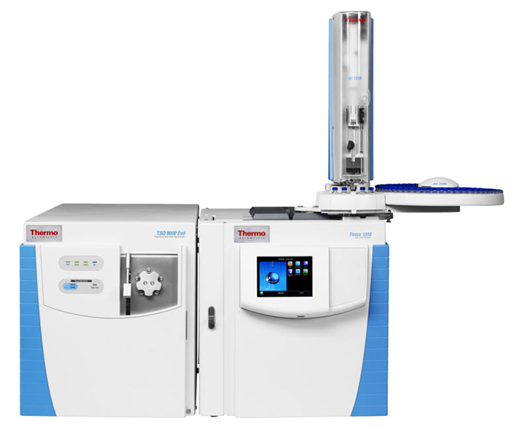
TSQ 8000三重四级杆气质联用仪 TSQ 8000 triple quadrupole GC-MS
关机步骤 Shutdown steps
1. 在TSQ Series Dashboard中选择Instrument Control,先设定MS transfer line Temp 至50 °C,Ion source temp至50°C,Send发送参数给仪器,后点击Shut down,等待Turbo‐pump Speed:0%,各温度需降至100 °C以下。1. Select Instrument Control in the TSQ Series Dashboard, first set the MS transfer line Temp to 50 °C, Ion source temp to 50°C, Send to send parameters to the instrument, then click Shut down, and wait for Turbo-pump Speed: 0% , each temperature needs to be reduced to below 100 °C.
2. 在TSQ Series Dashboard中选择Method Editor/Trace1300 GC中Get Method form GC查看仪器当前参数设置,将S/SL Inlet Temperature勾选去除(如配置气相检测器需将检测器Temperature勾选去除),再选择Trace1300菜单中的Send Method to GC将现有参数发送给仪器,等待进样口温度降至100 °C以下。2. In the TSQ Series Dashboard, select Get Method form GC in Method Editor/Trace1300 GC to view the current parameter settings of the instrument, uncheck S/SL Inlet Temperature (if configuring a gas phase detector, uncheck the detector Temperature), and then Select Send Method to GC in the Trace1300 menu to send the existing parameters to the instrument and wait for the inlet temperature to drop below 100 °C.
3. 关闭TSQ8000的电源,关闭GC的电源。 3. Turn off the power of the TSQ8000 and the GC.
4. 关闭钢瓶总阀及分压阀。 4. Close the cylinder main valve and pressure dividing valve.
开机步骤 Boot steps
1. 确认GC进样口端和MS端安装好毛细柱。 1. Confirm that the capillary columns are installed at the GC inlet end and MS end.
2. 确认TSQ8000的放空阀旋紧。 2. Confirm that the vent valve of TSQ8000 is tightened.
3. 检查载气净化器是否失效,如已失效需更换新的。3. Check whether the carrier gas purifier has failed. If it has failed, replace it with a new one.
4. 如需更换机械泵泵油、进样针、隔垫及衬管,开机前进行更换。4. If you need to replace the mechanical pump oil, injection needle, septum and liner, do so before starting the machine.
5. 打开载气(氦气)钢瓶的开关,确认总压大于2MPa,分压表调至0.5MPa。5. Turn on the switch of the carrier gas (helium) cylinder, confirm that the total pressure is greater than 2MPa, and adjust the partial pressure gauge to 0.5MPa.
6. 按照TSQ8000侧板上氩气接口上的压力数值设置分压表压力。6. Set the partial pressure gauge pressure according to the pressure value on the argon gas port on the side panel of TSQ8000.
7. 确认插座,保证Trace 1300和TSQ8000已经接通电源。7. Confirm the socket and ensure that Trace 1300 and TSQ8000 are powered on.
8. 打开电脑、气相、TSQ8000和自动进样器的电源开关,等待仪器自检。8. Turn on the power switches of the computer, gas phase, TSQ8000 and automatic sampler, and wait for the instrument self-test.
9. 打开电脑桌面上工作站软件,连接仪器,检查软件通讯是否正常。9. Open the workstation software on the computer desktop, connect the instrument, and check whether the software communication is normal.
10. 找到对应设置柱信息的命令标签(Column Setup或者 Column Properties),输入使用柱子的柱长内经等参数。10. Find the command label (Column Setup or Column Properties) corresponding to setting the column information, and enter the column length, inner diameter and other parameters of the column to be used.
11. 设置进样口的温度、载气和分流流量等参数,勾选“Vacuum compensation”。11. Set parameters such as the temperature, carrier gas and split flow rate of the inlet, and check "Vacuum compensation".
12. 在TSQ Series Dashboard中查看TSQ8000状态,分子涡轮泵开始启动,待转速达到100 %之后,前级泵压力达到200 mTorr以内,在TSQ Series Dashboard中选择Instrument Control,设定MS transfer line Temp 至250 °C,Ion source temp至280 °C,Send发送参数给仪器。12. Check the TSQ8000 status in the TSQ Series Dashboard. The molecular turbo pump starts to start. After the rotation speed reaches 100%, the backing pump pressure reaches within 200 mTorr. Select Instrument Control in the TSQ Series Dashboard and set the MS transfer line Temp to 250. °C, Ion source temp to 280 °C, Send sends parameters to the instrument.
13. 建议抽真空过夜(前级泵压力≤ 100 mTorr),再进行调谐或使用仪器。13. It is recommended to vacuum overnight (backing pump pressure ≤ 100 mTorr) before tuning or using the instrument.



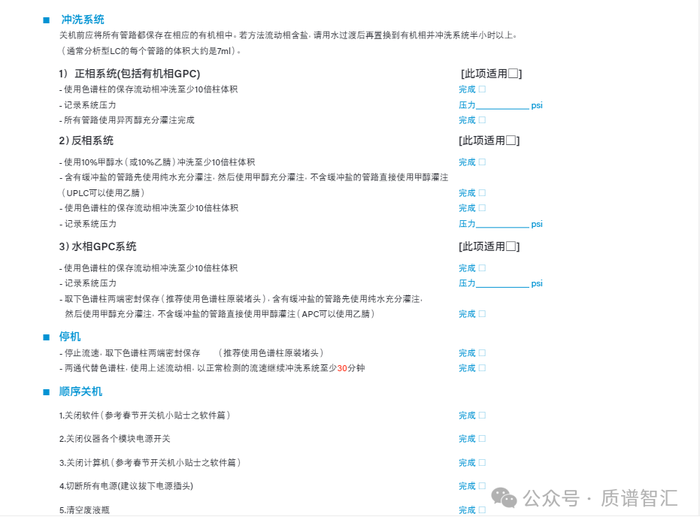
液相系统关机操作
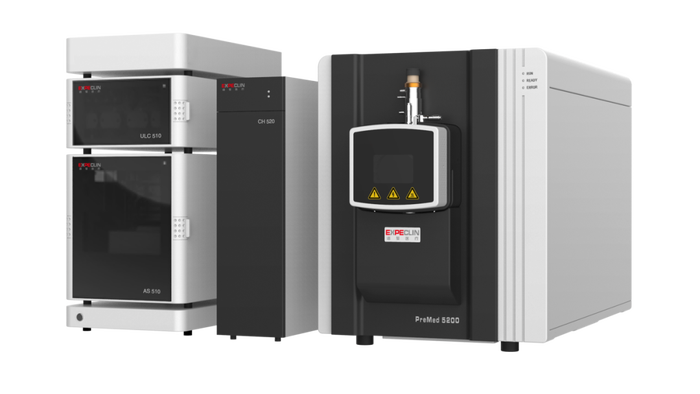
拆卸色谱柱,使用两通替代;
将四路流动相管路置于同一甲醇溶液中,A1、A2、B1、B2均进行流动相清洗;
最后将整个液相系统保存在甲醇中,关闭液相部分电源。
• 注意事项
不要让乙腈(ACN)静止在管路中超过一夜,很容易引发压力问题。
质谱系统关机操作
点击“真空控制”→“高级”→“卸载真空”;
待分子泵转速降为0时,提示“分子泵已停止工作”;
依次关闭质谱、机械泵、氮气发生器电源,同时关闭钢瓶气总阀;
退出控制软件,关闭电脑。
• 注意事项
若条件允许,建议不要关机,保持质谱“待机”状态;
如果长时间关机,建议拔掉质谱主电源线;
如果使用液氮罐,需关闭增压阀。


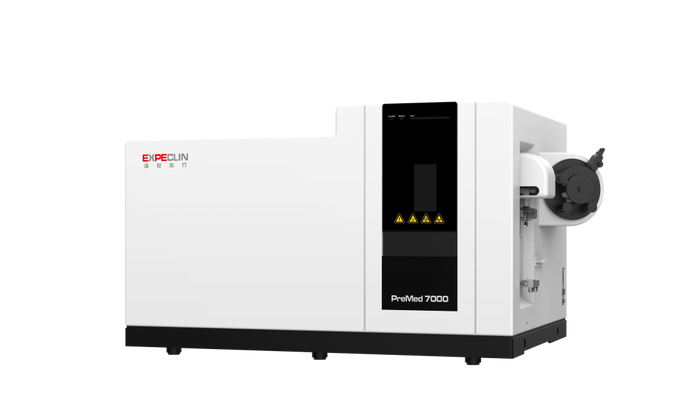
关机操作
熄火前将进样管和内标管放入5%稀硝酸中清洗5分钟,然后再都放入超纯水清洗5分钟,清洗结束后关闭等离子体;
仪器正常熄火后,关闭冷却循环水机;
将进样管和内标管都放置空气中,手动设置蠕动泵泵速30,使泵运转排空废液;
观察废液排完后设置泵速0,松开泵管卡扣、进样泵管、内标泵管及废液泵管,清空实验桌器皿内溶液和废液桶;
保存实验数据,退出仪器控制软件,关闭电脑电源、显示器及打印机;
关闭氩气/氦气开关,关闭排风系统,关闭仪器电源(含机械泵)、关闭UPS不间断电源(若仪器不关机则不需要该操作)和其他附件设备电源。
注意事项
若条件允许,建议质谱主机不关机,保持质谱“真空就绪”状态;
检查采样锥和截取锥,锥上有积盐的要进行清洗维护;
需要进行仪器关机时,确认仪器状态为真空就绪状态,可直接关闭主机电源,无需提前卸真空。真空腔内的真空度仍然能保持一段时间,能一定程度上减少仪器的损耗;
排风系统关闭后请将排风管连接口在仪器上取开,放置边上,以免放假期间有冷凝水或者风倒灌导致仪器内部污染或者故障;
冬季寒冷地区冷却循环水机在未使用防冻液的情况下请将冷却循环水排空。


开机操作
从 Off\停机至就绪 \Standby 状态
1. 打开氩气钢瓶的开关,确认总压大于 2MPa, 分压调至 0.135MPa;2. 打开氮气钢瓶的开关,确认总压大于 2MPa,分压调至 0.7MPa;3. 打开稳压电源开关,检查电源电压输出是否稳定且零地电压是否小于 1V;4. 检查机械泵,查看泵油颜色是否正常,呈浅黄色,油面在中间刻度线以上;5. 打开仪器左侧主电源开关-ON 位置,此时机械泵和分子涡轮泵会随之启动;6. 真空开关开启约 12 小时后(或者隔夜),打开电子开关,等待仪器自检,直到软件显示仪器状态为 Standby;7. 在 Tune 软件中检查仪器的真空度,前级真空小于 3.5 Torr,分析器压力(Analyzer Pressure)读数小于 9*e-6 Torr;8. 仪器开机完成。
• 注意事项
建议抽真空过夜,在使用前对质谱进行校正,保证仪器的最好状态,达到最优的灵敏度。
关机操作
1.实验结束后,清洗色谱柱,清洗过程中废液切出质谱;2.色谱柱清洗完成之后关掉泵的流速;3.将质谱设置为待机 Standby 状态;4.关闭电子开关 (Electronics Switch);5. 等待一分钟关闭质谱仪主电源开关 (Main Power Switch)至 Off (O)位置;6.关闭液相部分电源开关;7.关闭计算机;8.关闭 UPS 电源,关闭氮气及氩气钢瓶,总阀及分压阀。
• 注意事项1.更换或清洗离子传输管时,需降低离子传输管温度到 150℃以下;2.每隔 15 天,做一次机械泵震气,每次 15min;4.每半年或 5000 小时更换一次机械泵油。
网络
展源
何发
热点文章
-
管制范围持续扩张!美国更新“1286 ”清单,复旦、上交等上榜
2026-07-30
-

快讯!赛默飞任命Dan Rosen为中国区总裁
2026-08-18
-
哈工大谭久彬院士团队合作发明化学反应发光超分辨成像新方法
2026-08-14
-

2026 国自然集中接收项目评审结果放榜,多项资助规模上调
2026-08-26
-
多孔材料表征|深度解读比表面积、孔径分布与吸脱附等温线
2026-07-17
-
XPS图谱如何分析?
2026-06-30
-

-

《电子信息制造业 "十五五" 规划》发布:扩大国产电子专用设备和测量仪器使用
《电子信息制造业发展 "十五五" 规划》将 "提升电子专用设备及测量仪器供给能力" 列为核心任务,明确示波器、网络分析仪、椭偏仪等量检测与测量仪器攻关方向,高端国产仪器替代再提速。
作者:
-
12.5 亿赋能基础研究,国自然长三角联合基金重大专项启动
-
电子测量仪器“国家队”电科思仪登陆创业板,开盘大涨243%!
-
从 2026 半年报看国产力量:6 家视觉测量与无损检测仪器厂商财报盘点
-
知网收录丨《实验与分析》"材料联用表征技术" 专栏征稿
-
高校突发氢氟酸事故致3人伤亡,实验室该如何科学应急处置?

评论
加载更多